02 / Creative AI Open source · v1.7.1
Modly × Hunyuan3D-2.1An image-to-3Dextension for Modly.
Modly is a free desktop app that turns a picture into a 3D model on your own graphics card. My extension adds Hunyuan3D-2.1, a large image-to-3D AI model, and a texture pass that paints the model's surface. I made the texture pass fit cards with 16 GB of memory without changing the output.
- Role
- Sole developer
- Built
- July–August 2026
- Software
- Python, PyTorch, CUDA
- Runs on
- NVIDIA graphics cards on Windows and Linux

The problem
The texture pass needed more memory than a 16 GB graphics card has.
Graphics card, 16 GB
4.4 GB over
Reserved by the texture passMore than the card has1 block = 1 GB
Memory the pass reserved
–
20.4 GBon a 24 GB RTX 3090 card
Fits a 16 GB card
–
No4.4 GB short
This graphics card holds the AI models in 16 GB.
The old path loaded all three models onto the card.
Together they reserved 20.4 GB, 4.4 GB too much.
The fix keeps only the working model on the card.
What goes wrong, in technical terms
The extension runs the full Hunyuan3D-2.1 shape model, with 3.3 billion parameters, and an optional PBR (physically based rendering) texture pass.
The texture pass runs in stages: encode the condition images, run multiview diffusion, decode, then upscale and bake. On the full-GPU path, every model stays on the GPU for the whole pass. On an RTX 3090, that path reserved 20.4 GB, more than a 16 GB card holds.
The approach
Each AI model visits the graphics card only while it works.
Graphics card, 16 GB
13.0 GB reserved
The encoder moves onto the card and reads the image.
The diffusion model takes the card and paints six views.
The VAE decoder then turns the views into images.
With one model on the card at a time, the texture pass reserved 13.0 GB, which fits a 16 GB card.
How the staging works, in technical terms
Each stage needs only some of the models. The vision encoder visits the GPU once, for a single forward pass. The VAE visits twice: to encode the condition images and to decode the result. The large diffusion model stays only for the denoising loop. Between stages, idle weights wait in ordinary system memory.
On a 12 GB card, the staged path briefly places about 1 GB in system memory.
Decisions
Five design choices keep staging automatic and the install dependable.
How a model moves
–
Wholeat the start of its step
Time for the texture pass
111 sall models on the card
116 s5 s more, same output
Which path runs
–
Autochecks free memory first
On a 16 GB card
Model download
–
7.4 GBchecked before each load
- Size matches
- End of file intact
Compiler needed
–
Noneon standard Windows setups
- Ready-made parts included
- Other setups build them once
Each model moves onto the card in one piece.
Staging took 5 s longer, with the same output.
Auto mode stages only when the faster path won't fit.
The extension checks model files and downloads damaged ones again.
Windows builds ship ready-made parts, so most people never compile.
Staging turns on by itself, costs 5 s, and keeps the output the same. Installs check the model file and need no compiler on standard Windows setups.
How each choice works, in technical terms
Move whole components. Standard offloading works through hooks on each module. This pipeline's custom dual-stream architecture bypasses those hooks, so the extension moves whole components at stage boundaries. For this model, that's also the simpler design.
Trade a few seconds for memory. Staging moves the weights once per stage, which added 5 seconds in the recorded benchmark. The staged run took 116 seconds, and the full-GPU run took 111. The same weights run the same math, so the output stays the same.
Let the software choose. Auto compares free GPU memory with the measured peak plus a 1.5 GB safety margin. Most people never need to change the setting.
Protect a 7.4 GB download. A cut-short download leaves a checkpoint that PyTorch can't open. The extension checks the file's size and footer before every load, and downloads a damaged file again once.
No compiler for most people. Windows builds ship prebuilt native modules for the standard PyTorch install (CUDA 12.8). Other setups compile the modules on first use.
Evidence
The staged pass reserved 36% less memory with the same output.
Texture pass on an RTX 3090
- 13.0 GBmemory reserved on the cardwas 20.4 GB
- 36%less memory reserved
- 116 sfor one texture passwas 111 s
The benchmark's input and output

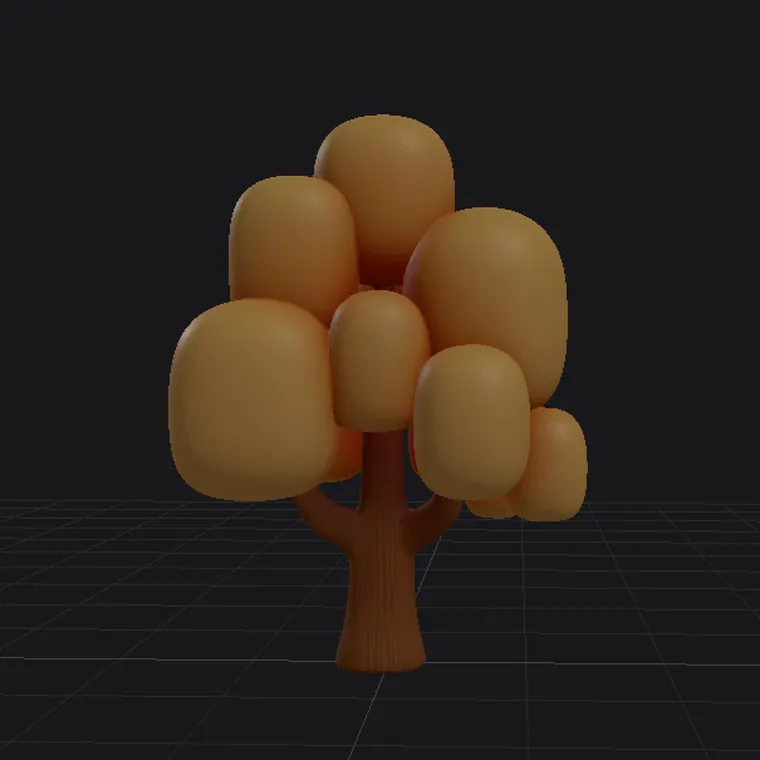
Rendered views of the two paths' outputs differ by 2.24 of 255 color levels, within the normal variation between runs.
In one RTX 3090 test, staging reserved 13.0 GB.
Both paths' models differ no more than any two runs.
Staging reserved 36% less memory, added 5 s, and kept the output the same.
Full benchmark, in technical terms
| Path | Reserved | Allocated | Time |
|---|---|---|---|
| Full GPU | 20.4 GB | 13.3 GB | 111 s |
| Staged | 13.0 GB | 9.1 GB | 116 s |
Tree input, seed 42. Stock sizes: 2048 render, 4096 texture, 512 view resolution, 6 views. Reserved memory is what PyTorch holds on the GPU, so it's the real footprint. The two outputs differ by 2.24/255 in view space, which is within run-to-run noise.
See the measurement recordOn the extension
"thanks again for the extension, it's brilliant!"