03 / Audio engineering Public alpha · v0.4.0
EARS BridgeAn app that connectsa headphone test jig to Dirac Live.
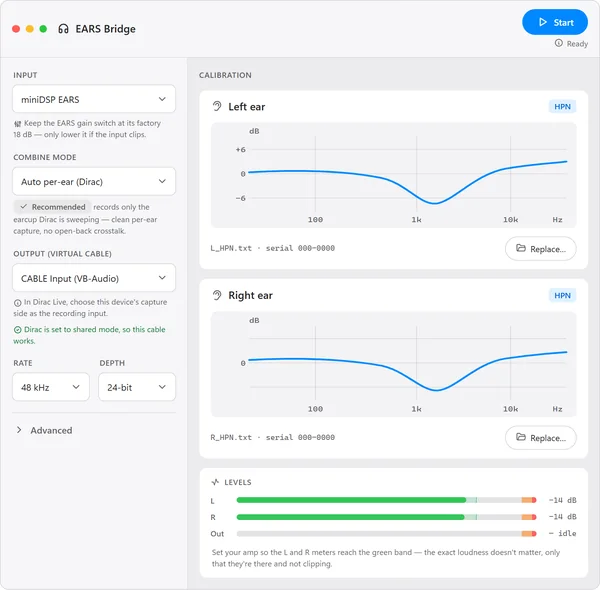
Dirac Live is software that measures a sound system with test sounds and one microphone, then builds a filter that corrects it. The miniDSP EARS is a test jig for headphones, with a microphone in each ear. My app, EARS Bridge, lets Dirac Live measure and correct headphones on the jig.
- Role
- Sole developer
- Built
- June 2026 to now
- Software
- C++20, JUCE 8, Catch2
- Runs on
- Windows 11
The problem
Dirac Live takes one microphone, and the EARS jig has two.
Jig clock
Cable clockdrift
Signal Dirac gets
–
Both earswith sound leaked from the other ear
Timing between test sounds
–
DriftsDirac rejects the measurement
Dirac Live takes one microphone, but the jig has two.
Mixing the two microphones adds sound leaking between the ears.
Two clocks drift apart, so Dirac rejects the measurement.
EARS Bridge solves both: it sends Dirac one calibrated ear at a time, with steady timing.
What goes wrong, in technical terms
Dirac Live builds a correction filter from test sweeps that one calibrated microphone records. The miniDSP EARS has a microphone capsule in each ear, and each capsule has its own factory calibration.
A simple mix of the two capsules gives Dirac the wrong signal. Open-back headphones leak sound into the other capsule, so a mix folds that leakage into every sweep. The jig and the virtual cable to Dirac also run on separate clocks. If the timing drifts from sweep to sweep, Dirac rejects headphone captures as "imprecise".
The approach
EARS Bridge calibrates each ear and gives Dirac one ear at a time.
In the left test, Dirac gets only the left ear.
In the right test, Dirac gets only the right ear.
miniDSP makes the jig, and Dirac makes Dirac Live. My app sits between them: it calibrates each ear, picks the one Dirac is measuring, and keeps the timing steady.
How the signal path works, in technical terms
EARS Bridge captures both ears and applies each ear's calibration as a minimum-phase inverse filter. In the default Auto per-ear mode, it follows Dirac's left-then-right sweep and forwards only the ear that Dirac is measuring. A virtual audio cable carries that signal to Dirac as its microphone.
A lock-free, drift-correcting sample-rate converter joins the two clocks. During a sweep, it holds one fixed ratio, so every sweep has the same timebase. The calibration filters rebuild on a background thread when a file or the sample rate changes.
Decisions
Five design choices protect each measurement and remove a setup error.
Sent to Dirac
–
One earper test sound
- Left ear, then right ear
- Mixes marked "not for Dirac"
Timing in a test sound
–
Heldone fixed rate per sound
Jig
Cable
Audio rate
–
Checkedagainst the rate Windows uses
- Rate asked for = rate in use
- Unsure: check marked approximate
Dirac error 600007
600007Dirac can't open the cable
Fixedwith one click
- Dirac set to shared mode
Network use
–
1 requestper launch, to check for updates
- Never downloads or installs
- A setting turns it off
The app never mixes the ears for Dirac.
Timing holds still. Too much drift marks a measurement invalid.
The app checks that Windows kept the requested audio rate.
One button fixes Dirac's error 600007 by switching modes.
The app's only network use is an optional update check.
Dirac gets one ear with steady timing, the rate is checked, error 600007 takes one click to fix, and the network is used only for updates.
How each choice works, in technical terms
Never mix the two ears for Dirac. Auto per-ear is the default and the only mode that works with Dirac. The mixing modes, such as average and sum, stay available for other tools, and the app labels them "not for Dirac".
Hold the clock still during a sweep. The converter normally corrects drift on every audio block. During a sweep it freezes the ratio and lets buffer headroom absorb the drift. If the drift outruns the headroom, the capture is marked invalid. The app never retimes a capture silently.
Check the rate Windows really uses. To learn whether Windows resampled the EARS stream, the app compares the requested sample rate with the rate Windows actually runs the device at. When it can't prove the stream is untouched, it shows "clip detection approximate".
Fix the setup error in one click. Dirac opens its recording device in exclusive mode by default, and the standard virtual cable has no exclusive format. The result is Dirac error 600007. One button sets Dirac's own shared-mode switch for the user.
Use the network only to check for updates. The only network request is one call per launch to GitHub's public releases API. The app shows an update link and never downloads or installs anything. A setting turns the check off.
Evidence
A code audit made the clipping checks stricter.
What the clipping audit changed
- A clipped test soundReported as cleanMarks it invalid
- Broken samplesNot checkedMarks it invalid
- Part of the run checkedThe whole runOnly Dirac's test sound
- Timing correction in a test soundAdjusted all the timeHeld still
- Audio format change in a runNot detectedDetected, marks it invalid
Automated tests
- 62unit-test files
- 2systems they run on: Windows and macOS
Each release waits for every test to pass.
I fixed every blocking audit finding on clipped, too-loud recordings.
Releases wait for 62 test files on Windows and macOS.
A clipped or damaged measurement is now marked invalid, and each release waits for the tests to pass.
The audit, in technical terms
The app reports whether any clipping reached Dirac. In June, a read-only audit tested every code path behind that report. Parallel reviewers traced each path to a file and line, and separate verifiers tried to disprove each finding. I fixed each blocking finding and kept the audit in the repository.
| Finding | Before | Now |
|---|---|---|
| A clipped sweep | Still reported as clean | A confirmed clip invalidates the capture |
| NaN or infinite samples | Not checked | Invalidate the capture |
| Checked window | The whole Start-to-Stop run | Only Dirac's sweep |
| Converter ratio in a sweep | Adjusted every block | Frozen. A forced correction invalidates |
| Format change during a run | Not detected | Detected. Invalidates the capture |
Guidance flags, such as a low level or a possible Windows resample, warn without invalidating. The 62 unit-test files run on Windows and macOS in CI, and each release waits for the suite to pass.