05 / Developer tools Open source · v1.2.0
Hermes Classic GoldA theme and telemetry packfor Hermes Agent.
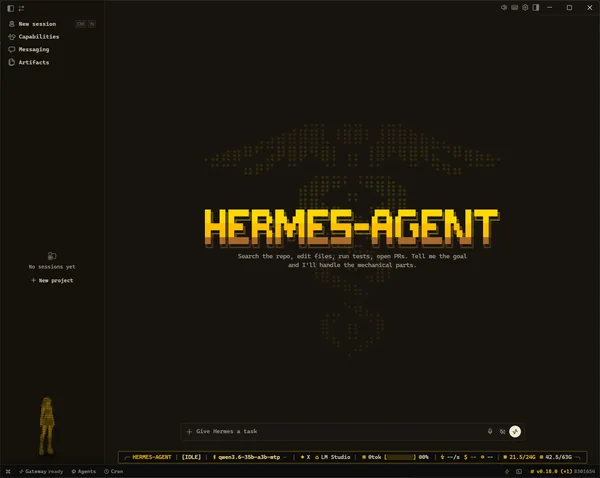
Hermes Agent is an open-source AI agent from Nous Research. Classic Gold gives its desktop app a gold theme and a telemetry tape, a strip of numbers about the running session. It shows the model, the cost, and the computer's memory at a glance.
- Role
- Sole developer
- Built
- July–September 2026
- Software
- JavaScript, Python, Hermes plug-in SDK
- Runs on
- Hermes Desktop on Windows
The problem
The tape had to survive Hermes updates.
TapeModelContextCostMemory
Hermes code
Replaced by each update
- Tape patch
- Undone by the update
Where the tape lived
–
Hermes codeas a patch
After a Hermes update
–
Goneor the update stops on a conflict
I wanted one strip showing a session's key numbers.
My first version added the tape by editing Hermes code.
Hermes updates then undid the edit or hit a conflict.
Version 1.2 installs as a plug-in in the Hermes profile, which updates leave in place.
What went wrong, in technical terms
During an agent session I want a few facts at a glance: which model and provider run, how full the context is, what the session costs, whether the prompt cache hits, and how much memory is left on the machine that runs the model.
The first version added its status bar as a patch to the Hermes source. A Hermes update then reverted the patch, or stopped on a Git conflict.
The approach
A plug-in draws the tape, and a small backend reads the numbers.
Tape menus switch the model, reasoning level, and provider.
A small backend program reads cost and context from Hermes.
The backend also reads main and graphics memory, even remotely.
The tape and the backend install inside the Hermes profile as a plug-in, so a Hermes update leaves them in place.
How the plug-in works, in technical terms
Version 1.2 installs through the public Hermes plug-in SDK (software development kit). It adds a renderer plug-in for the theme and the tape, and a small Python backend for telemetry, both inside the Hermes profile. The context is the text the model holds at once, and the tape shows how full it is. The Hermes checkout stays untouched, so a normal update can't conflict with it.
The backend runs on the host that runs Hermes, so RAM and VRAM describe the machine that does the work, even when it's a remote server.
Decisions
Five design choices keep the tape honest, the install safe, and messages private.
A value it doesn't know
–
--shown as unknown
Speed --Cost --
More than one profile
–
Won't guessyou name the profile
- A dry run shows each change
- No profile picked for you
Uninstall removes
–
Its own filesonly if unchanged
- Files it wrote, unchanged
- Your edits stay
Narrow windows
–
Fields hidebefore they crowd
Full
1180 px
1000 px
880 px
Message text read
–
Noneonly cost and display fields
- No prompts or messages
- No network requests to install
The tape never invents numbers. Unknown values show as --.
The installer never guesses a profile, and writes have previews.
Uninstall removes only unchanged files, so your later edits stay.
In narrow windows, fields hide before they crowd.
The backend never reads your prompts or messages.
The tape shows only numbers it knows, the installer never guesses or removes your edits, and the backend never reads messages.
How each choice works, in technical terms
Show unknown as unknown. The tape never invents a value. Speed is the average over a finished turn, and a cost that is only estimated shows as --.
Refuse to guess the target. With more than one Hermes profile, the installer refuses to choose. Every command that writes has a dry run, and --yes skips a prompt but never picks a profile.
Remove only what it can prove it installed. The installer records what it writes. Uninstall removes or restores only recorded files whose hashes still match, and leaves later user edits in place. Migration from the old source patch restores a file only when its backup matches the current Hermes version exactly.
Hide fields before they crowd. The tape drops RAM and VRAM below 1180 px, then speed, cost, and time below 1000 px. Below 880 px it hides completely. These rules win over user settings.
Read no message text. The backend reads the session record for cost and display fields only. It never reads prompts or messages, and the install scripts make no network requests.
| Field | Shows | Shows -- when |
|---|---|---|
| Speed | Output tokens ÷ the full turn time | The turn is still running |
| Cost | The provider's actual session cost, or 0.00 for an included plan | The cost is unknown or only estimated |
| Cache hits | Cache reads ÷ (input + cache reads + cache writes) | No cache read is recorded yet |
| RAM | Used and total memory of the backend host | psutil isn't available |
| VRAM | Used and total memory of all NVIDIA GPUs on the host | nvidia-smi isn't available |
Evidence
I traced a context‑count error and sent a fix to each project involved.
What the context gauge showed
Tokens are the word pieces a model reads. No single model held 238,000 of them.
Fixes sent to each project
- In reviewCount the acting request as contextHermes Agent · pull request 109388 · 361 tests passed
- In reviewKeep shrinking old context in long turnshermes-lcm · pull request 586 · a new test runs five compactions in one turn
- In reviewFix the context gauge on the tapeClassic Gold · pull request 15 · 207 renderer and 28 backend tests passed
Release 1.2.0
- 206tests passed
- 2systems in automated testing: Windows and Ubuntu
Automated checks also include code style and security scans.
Hermes added up two models' requests and showed 238,000 tokens.
I sent fixes to Hermes, hermes-lcm, and my pack.
Release 1.2.0 passed its 206 tests.
Three fixes are in review, each with passing tests, and release 1.2.0 passed its 206 tests.
The error and the fixes, in technical terms
With mixture-of-agents, Hermes could count an 8,000-token acting request and a 230,000-token advisor request as 238,000 tokens in one context. The gauge then showed a context that no single model had. I traced the fault into Hermes and its compaction plug-in, and sent a fix to each layer.
Hermes Agent, "Separate context usage and preserve acting output budgets". Context pressure uses the acting request, and billing keeps the combined total. 361 tests passed across 24 related files.
hermes-lcm, "Rearm the compaction budget after LCM progress". After three successful compactions in one long turn, automatic compaction stopped. A new test runs five compactions in one turn and passes only with the fix.
Classic Gold, "Fix the active context gauge for MoA and compaction". A 120,500-token active context stayed at 120,500 when the compressor reported 513,000. 207 renderer and 28 backend tests passed.
Release 1.2.0 passed 206 Node tests, the telemetry backend tests, and bundle tests on Node 18. CI runs on Windows and Ubuntu, with lint and CodeQL.